


Transact eAccounts
4.5349.00 Reviews
App Specs
- Version
- 2026.5.0 (2026071302)
- Updated On
- License
- Free
- Downloads
- 500,000+
- Developer
- Transact Campus Inc.
- Categories
- Education
- Platform
- Android
Screenshots
 Analysis by AppCompare
I see Transact eAccounts as a practical campus utility, not an all-purpose student-life app. Its value depends on whether your school uses it for access and account tasks: when it fits your campus setup, it can make routine errands easier; when it does not, there is little reason to keep it. That distinction matters more than any broad promise of convenience.
Transact Campus Inc. makes this free education app for students and staff who need to handle supported campus accounts from a phone. It has a 4.1 average from around 3,000 ratings, and more than 100,000 installs. I would treat those figures as a sign that it serves a real, recurring need, not as proof that every school enables the same tools.
What it is useful for in a normal week
The strongest case for the app is reducing small bits of friction. If your campus connects your account, you can check the information you need while away from a desktop and deal with supported payments or access in the same place. That is most valuable at the moment you need it: outside a residence hall, approaching a campus payment point, or deciding whether your account needs attention before you leave home.
For example, imagine you are heading to class and realize you may need to use your campus account later that day. Instead of waiting until you reach a computer, you can open the app and check what your linked account shows. If it offers the relevant action for your school, you can handle it there and avoid making a separate trip just to sort out a routine account task. The useful habit is to check before you are in a hurry, rather than discovering a problem at a door or checkout.
That convenience is different from what a general banking app or mobile wallet provides. Those tools may help with ordinary purchases, but they are not a substitute for campus-specific account access. Conversely, if your only need is paying with a standard bank card, your existing wallet may be simpler. I would use eAccounts for the campus relationship, not expect it to replace every payment app on my phone.
Campus setup determines the experience
One important trade-off is that a campus account app is only as useful as the services your institution has connected to it. The same app can feel essential to one student and unnecessary to another, depending on local configuration and the tasks their school makes available. Before relying on it for a particular errand, check that your institution is supported and that the action you need appears after you sign in.
This also answers a practical question: does installing it automatically give you access to every campus service? I would not assume so. The app is a route to supported account functions, while your institution determines which ones apply. If a function you need is missing, the right next step is to check your school’s instructions or use its official alternative, rather than repeatedly searching through menus.
Worth Reading Before You Choose

EA SPORTS FC Mobile 26 Is a Bigger Football Game, but It Takes Time

Flipboard Shows What News Apps Must Do Beyond the Feed

Switching to Android Auto Means Rethinking Your Driving Routine

Google Calendar Makes a Crowded Week Easier to Manage

Ludo King Makes the Most of the Minutes Between Plans

Baby Panda World Brings Quick Play to Modern Phones, but Its Game Library Feels Busy
For a smoother first use, I would set it up while I have time and a reliable connection, not while standing at a locked entrance or in a checkout line. Confirm that you can reach the relevant account screen before the situation becomes urgent. If you manage more than one campus-related responsibility, make a quick habit of reviewing the account details you actually use; there is little benefit in opening the app every day if your balance or access status rarely changes.
Where it can fall short
Its focused purpose is also its main limitation. This is not a universal campus guide, a replacement for your school portal, or a guarantee that every dining, event, map, or residence feature will be available. I would not install it expecting a complete student dashboard. The useful question is narrower: does your campus use eAccounts for the account or access task you want to manage?
There can also be a learning curve when campus terminology differs from the labels you expect. If you are unsure which account or option applies, pause and check your institution’s guidance before making a payment or changing account details. That is a sensible precaution with any app connected to campus funds or access, and it is better than treating an unfamiliar screen as self-explanatory.
People who rarely use campus services, have no supported account, or already handle their needs through a simpler method may find this is just another app to maintain. It is also not the best choice when you need broader information such as course materials or a full campus calendar; a school portal or dedicated campus resource is more appropriate for those jobs. I like tools that solve a specific problem, but I would not confuse a useful niche with an all-in-one solution.
Who should keep it installed
I would recommend it most to students living on campus, people who regularly use campus accounts, and staff who need quick access to supported services. It is particularly worthwhile if checking an account or handling an eligible task on the go saves you a repeat visit or a queue. If you only use campus facilities occasionally, try it when you have a concrete need and decide whether it genuinely replaces a slower step.
The app is free and rated for Everyone, which makes trying it a low-commitment choice, but the benefit still depends on your institution. Its current version is 2026.3.1 (2026031801), and it first appeared on January 14, 2019. I would keep it updated through the usual app-store process, especially if I rely on it for a routine campus task, while remembering that an update cannot add services a school has not enabled.
Streamlining Campus Life
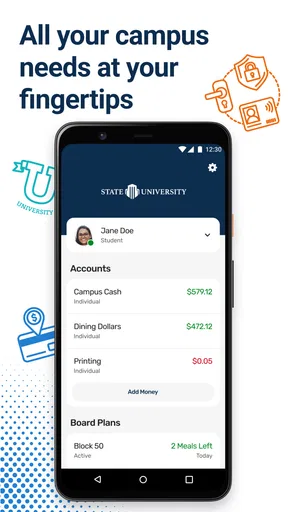
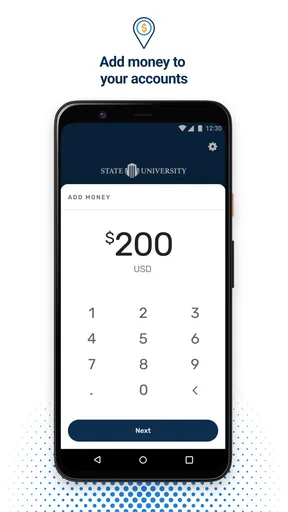
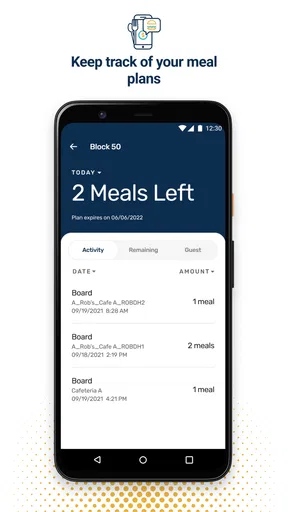
Transact eAccounts is your one-stop-shop for managing all those pesky campus account details. Whether it's checking your meal plan balance while standing in line at the cafeteria or quickly adding funds to your card before hitting the bookstore, this app has got you covered.
Features That Make Your Life Easier
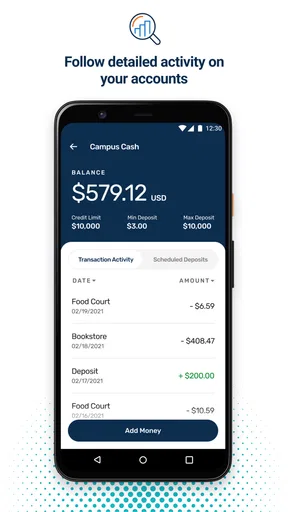
First off, the user interface is clean and straightforward, which is a huge relief given how confusing university portals can be. You can easily navigate through your account balances, transaction history, and even add funds with just a few taps. No more scrambling to find a computer to log into your account!
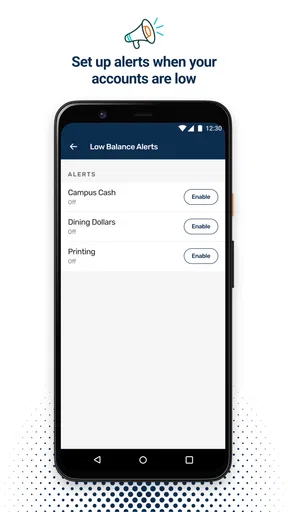
Another feature I find super handy is the real-time notifications. You get updates on your account activity instantly, which is perfect for keeping track of spending and ensuring you’re not blowing your budget on late-night snacks.
Security and Convenience
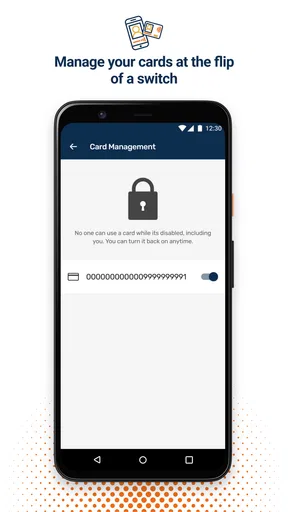
Security is a big deal, right? Well, Transact eAccounts uses biometric authentication like fingerprint and face recognition, adding that extra layer of protection. So even if your phone goes missing, your account info stays safe.
Plus, the app integrates seamlessly with other campus services. Need to check your dining options? Want to know the schedule for the next game? It’s all there, making staying connected with campus life as easy as pie.
Why It Stands Out
What really sets this app apart is its ability to centralize all campus-related activities. It’s not just about managing funds; it’s about enhancing your entire campus experience. From checking event schedules to accessing campus maps, it’s like having a personal campus concierge in your pocket.
And the best part? It’s available for both Android and iOS, so no one’s left out in the cold. The app is regularly updated, ensuring you always have the latest features and security enhancements.
Final Thoughts
In a world where time is money, Transact eAccounts offers a level of convenience that’s hard to beat. Whether you’re a freshman finding your way or a senior trying to make the most of your final year, this app can be a real lifesaver. So go ahead, give it a try, and see how it can transform your campus life.
Ready to streamline your student experience? You can download the Transact eAccounts app via the links provided on our site. Trust me, it’s worth the space on your phone!
Pros
- User-friendly interface simplifies navigation.
- Real-time balance updates enhance accuracy.
- Secure login ensures data protection.
- Supports multiple payment methods.
- Custom notifications keep users informed.
Cons
- Limited offline functionality.
- Occasional sync issues reported.
- In-app ads can be intrusive.
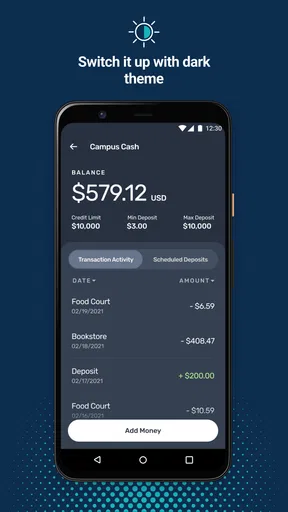
- No dark mode option available.
- Customer support response time varies.
FAQs for Transact eAccounts
What is Transact eAccounts and how does it work?
Transact eAccounts is a digital wallet app that allows users to manage their campus accounts efficiently. It integrates with university systems to provide access to meal plans, campus funds, and other services. Users can easily check balances, add funds, and view transaction history directly from their smartphones.
Can I use Transact eAccounts on multiple devices?
Yes, Transact eAccounts can be installed on multiple devices. However, for security reasons, you may need to authenticate each device separately. Always ensure that your app is updated to the latest version to enjoy seamless synchronization across all your devices.
Is my financial information secure with Transact eAccounts?
Transact eAccounts uses advanced encryption and security measures to protect your financial information. The app is designed to comply with industry standards for data protection, ensuring that your transactions and personal data remain secure and confidential.
What features does Transact eAccounts offer?
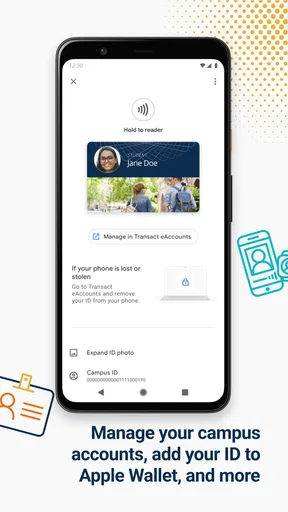
Transact eAccounts offers a range of features including balance checks, fund transfers, transaction history, and campus ID functionality. It also supports mobile payments and can be used to access various campus services, providing a convenient, all-in-one solution for students and staff.
How do I add funds to my Transact eAccounts?
Adding funds to your Transact eAccounts is simple. You can link a bank account or credit card to the app and transfer money directly. The app may also support other funding options like PayPal or campus-specific methods, depending on your institution's setup.


